Invisible Discord name and blank text
A blank display name, a server nickname nobody can read, a message that looks empty: Discord's display names accept almost any character, so a blank one is possible. Discord also says it limits some invisible characters, so check what you copied before you rely on it.
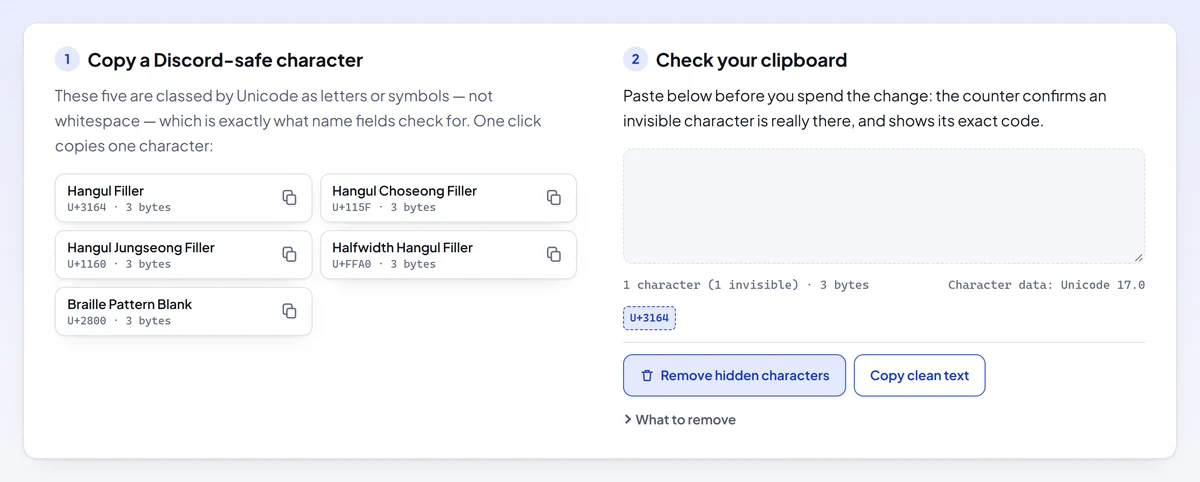
Copy a Discord-safe character
These five are classed by Unicode as letters or symbols — not whitespace — which is exactly what name fields check for. One click copies one character:
Check your clipboard
Paste below before you spend the change: the counter confirms an invisible character is really there, and shows its exact code.
0 characters
Character data: Unicode 17.0
What to remove
Username, display name or server nickname: where a blank fits
Discord gives every account three kinds of name, and only two of them can be blank. The rules below are Discord's own, from its Help Center article on usernames and display names and its developer documentation.
| Name | Length | What Discord accepts | Blank possible? |
|---|---|---|---|
| Username | 2 to 32 | Latin letters a–z, digits, underscore and period only; forced lowercase; changeable twice a week | No |
| Display name | 1 to 32 | Almost anything: spaces, emoji, special and non-Latin characters; changeable any time | Yes, with a blank letter |
| Server nickname | 1 to 32 | Same as display names; shown instead of the display name in that server | Yes, if the server lets you change it |
Two lines in the developer documentation decide which blank works. Names are «trimmed of leading, trailing, and excessive internal whitespace», so a name made of spaces ends up empty and is refused. And Discord says it limits «some zero-width and non-rendering characters» without listing them, which is why a character that worked for a friend can fail for you after an update.
Set a blank display name or server nickname
Copy the Hangul Filler (U+3164) from the card above first. Unicode files it as a letter, not as whitespace, so the trimming step leaves it alone. Menu labels move between app versions; these are the routes Discord and the current apps use.
Display name, on desktop
- Open User Settings (the gear next to your name at the bottom left).
- Go to your profile settings and select the Display Name field.
- Delete the current name, paste the character, and save.
Display name, on a phone
- Tap your avatar («You») in the bottom bar, then Edit Profile.
- Clear the Display Name field, long-press it and choose Paste.
- Save. The blank shows wherever no server or friend nickname overrides it.
Server nickname, on either
- Open the server menu (the server name at the top) and choose Edit Server Profile.
- Paste the character into Nickname and save. It applies in that server only.
- No Nickname field? The server has not given your role the Change Nickname permission.
If saving fails, paste what you copied into the checker above first. A tag reading U+3164 means the character arrived; no tag means your clipboard held an ordinary space, which Discord trims away.
Why Discord refuses or removes a blank name
- It was a space. Ordinary and no-break spaces are whitespace, and Discord trims whitespace from names. Use a character from the card, not the space bar.
- The character is on Discord's limited list. Discord limits some zero-width and non-rendering characters and does not publish which. If the Hangul Filler is refused, try the Halfwidth Hangul Filler (U+FFA0) or the Braille Pattern Blank (U+2800) from the card.
- An anti-abuse rule caught it. The developer documentation mentions further restrictions «not shared here for the sake of spam and abuse mitigation». No character is guaranteed to pass them.
- The server blocks it. Server owners can turn on AutoMod's «Block Words in Member Profile Names». A member whose name matches the server's list gets an error and has to change the name before talking there.
- A moderator changed it. Server nicknames can be set for you by anyone with permission, so a blank nickname can be replaced with a readable one.
Messages that look empty
A message made only of ordinary spaces has nothing left once whitespace is trimmed, so it does not go through. The Braille Pattern Blank (U+2800) is the usual answer: Unicode classes it as a symbol, not as whitespace, so the message keeps its content and shows as a blank line. Stack several with line breaks between them and you get a tall empty block — a running joke format in many servers. Use it with judgment: what a friend finds funny once, a moderation bot may read as spam when repeated.
Channel names, categories and roles
Server owners use invisible characters as design tools: a category named with a single blank character reads as a clean separator in the sidebar, and a role with an invisible name adds spacing to a member list. Text channel names are reformatted more strictly than categories and roles (spaces turn into dashes), so a blank there is less predictable. Test on a private server first, and keep a visible fallback name written down: an all-blank sidebar is impressive right up until you need to find the settings channel.
Frequently asked questions
Why does the blank name fail in the username field?
Because usernames only accept lowercase a–z, digits, underscore and period, by Discord's policy. Blank names belong in the display name and server nickname fields, which accept almost any character, minus the zero-width and non-rendering ones Discord chooses to limit.
Why does my blank name show in one server but not another?
A server nickname replaces your display name inside that server only. If you blanked the nickname, other servers still show your display name; if you blanked the display name, a server where you set a nickname shows the nickname instead.
Will an invisible name get me banned?
The characters are ordinary Unicode and using them in a name breaks no platform-wide rule we know of — but individual servers set their own rules, and some require readable names so moderators can address people. If a server asks you to be identifiable, be identifiable.
Which character is the most reliable?
The Hangul Filler (U+3164) for names, the Braille Pattern Blank (U+2800) for messages. When one stops working after an app update, try its neighbours in the full character library; Discord does not say which characters it limits, so there is no permanent answer.